
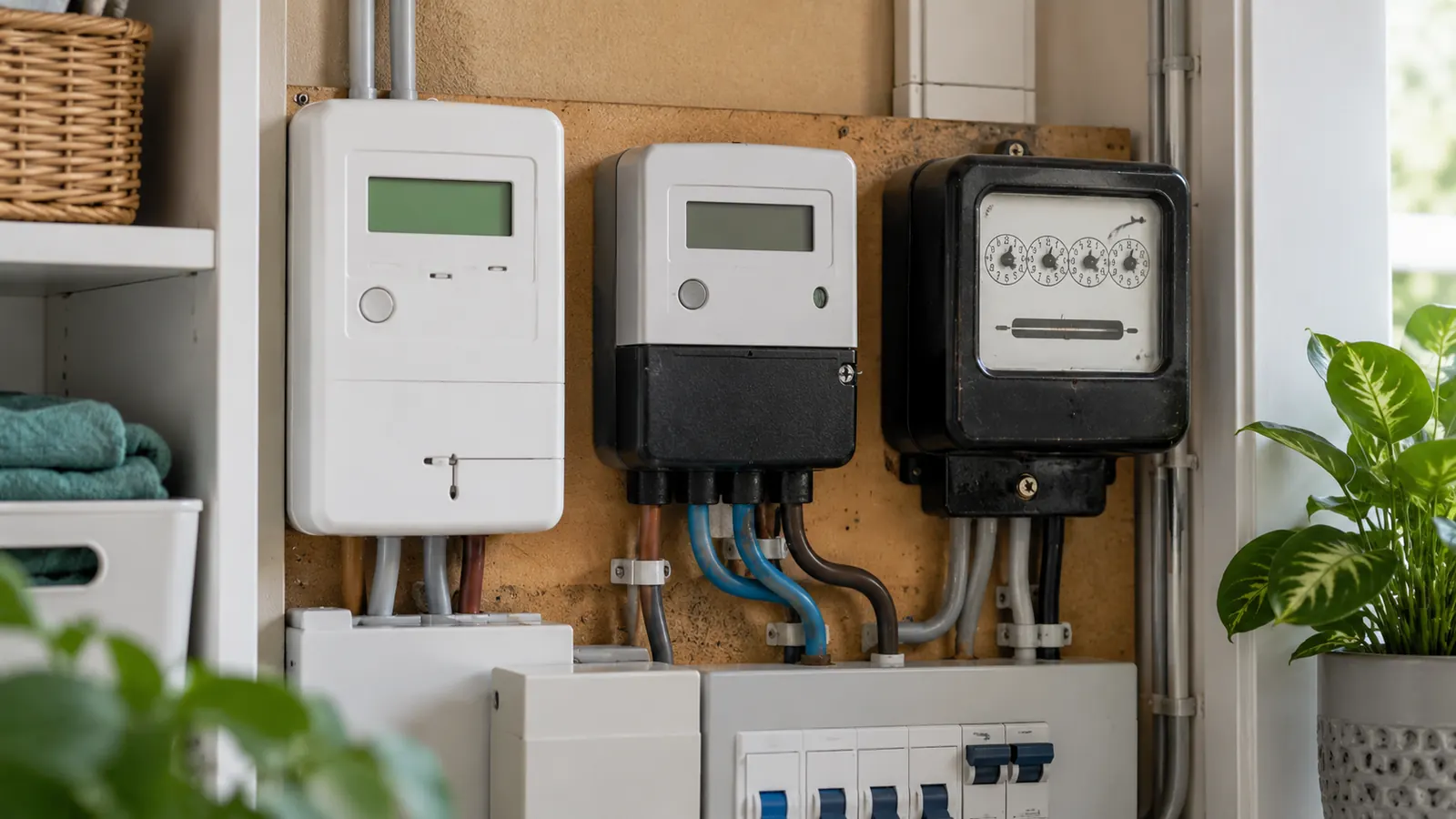
The quickest way to identify your electricity meter
Find the fixed electricity meter, usually in an outside box, hallway cupboard, under the stairs or in a communal meter room. Do not identify it from the small portable in-home display: Citizens Advice explains that the display is separate from the smart meter itself. Check the meter serial number against your bill before recording a reading, especially where several meters are together.
Look for a digital screen and buttons. A smart meter normally has an electronic display and can send readings to the supplier, but an older digital meter can look similar. Your bill, supplier account or Citizens Advice smart-meter checker can confirm whether it is operating in smart mode.
Next check whether the meter shows one usage register or cycles through two or more. Separate day and night usage on the bill is another sign of a multi-rate arrangement. Finally, check how you pay: smart, two-rate and prepayment are overlapping categories.
- Smart or traditional: does the supplier receive readings remotely?
- Single-rate or multi-rate: does the meter record one register or separate time periods?
- Credit or prepayment: do you pay after using electricity or add credit first?
Smart electricity meters and in-home displays
A smart electricity meter measures electricity in kilowatt-hours and normally sends readings automatically. Ofgem says smart meters can work in either credit or prepayment mode, so changing between those payment methods does not necessarily require a physical meter replacement. Some tariffs also use half-hourly smart data to charge different prices at different times.
The in-home display, sometimes called an IHD or smart energy monitor, is not the meter. It shows near-real-time usage and estimated cost but is a separate portable device. Readings required by a supplier should come from the fixed meter unless the supplier gives different instructions. Button sequences vary, but common reading screens include “Total Active Import”, “IMP”, “Rate 01” and “Rate 02”.
Digital, mechanical and dial meters
A traditional digital meter has an electronic display but no working remote connection to the supplier. A mechanical meter uses a row of number wheels, often with a final red digit. For both, read from left to right and normally ignore a red digit or anything after a decimal point. A single-rate display might show 041286.7 kWh; the reading to submit would usually be 41286.
A dial meter has several clock-like dials whose pointers often turn in alternating directions. Citizens Advice says to read the first five dials from left to right, ignore red dials and any marked 1/10, and use the lower number when a pointer sits between two numbers. Between 9 and 0, record 9. If a pointer sits exactly on a number, the dial to its right determines whether that number has fully turned.
Never remove covers or touch wiring. If the screen is blank, the casing is damaged, there is a burning smell or the equipment is inaccessible, contact the supplier or network operator as appropriate.
Single-rate, Economy 7 and other multi-rate meters
A single-rate meter records all imported electricity on one billing register. A two-rate or dual-rate meter records separate periods, commonly labelled day and night, normal and low, or Rate 1 and Rate 2. Ofgem says Economy 7 needs a meter capable of recording peak and off-peak use separately; that can be a traditional two-rate meter or a compatible smart meter.
Do not assume Rate 1 always means night or that a label “N” means night: on some meters it means normal. Compare the registers in the morning and again later in the day, or ask the supplier to confirm how each register maps to the bill. The exact cheap hours depend on the tariff, region and meter setup, so identify them from the tariff terms rather than the meter name alone.
For example, if the day register moves from 18,240 to 18,390, day use is 150 kWh. If the night register moves from 9,510 to 9,566, night use is 56 kWh. Total use is 206 kWh, but the supplier prices 150 kWh at the day rate and 56 kWh at the night rate. Add one standing charge for the billing period, not one per register.
Prepayment, pay-as-you-go and Northern Ireland keypad meters
A prepayment or pay-as-you-go meter requires credit before electricity is used. Older models may accept a key, card or code, while a smart meter can be switched into prepayment mode and topped up remotely. The payment method does not tell you whether the meter is single-rate or multi-rate, so check the usage registers and bill or annual statement as well.
Northern Ireland has separate electricity-market arrangements and widespread keypad meters. Power NI instructs customers to press 9 and read the digits from left to right for a meter reading. Other keypad screens can show balance, current demand and previous usage, so use the supplier’s model-specific instructions if the display differs.
Do not compare top-ups directly with metered kWh. Credit can also cover standing charges, emergency credit or debt deductions. Estimate usage from the kWh registers and matching tariff rates.
Use your meter type to check an electricity bill
Match the meter serial number to the bill and compare the actual reading with the billed reading. A reading marked estimated, often with an “E”, has not been taken directly from the meter. Submit a current reading if accepted and retain a dated photograph.
For a single-rate meter, subtract the earlier reading from the later one to find kWh used. Multiply that by the unit rate, then add the daily standing charge for the number of days. For a multi-rate meter, repeat the subtraction and multiplication separately for each register before adding one standing-charge total. The electricity bill calculator can do the single-register arithmetic; run it separately for each rate when necessary.
If the recorded meter type is wrong, or day and night registers appear reversed, contact the supplier. Keep photographs and note which register changes at which time.
Electricity meter type FAQs
How can I tell if my electricity meter is smart?
Check your bill or supplier account and ask whether the meter is sending automatic readings in smart mode. A digital screen or an in-home display suggests a smart setup but is not proof by itself, because some traditional meters also have digital screens.
Is a smart meter the same as a prepayment meter?
No. Smart describes the meter’s communication capability; prepayment describes when you pay. Ofgem says a smart meter can operate in either prepayment or credit mode.
How do I know if I have a two-rate electricity meter?
Look for two usage registers or separate day and night figures on the bill. The meter may show both at once or cycle through Rate 1 and Rate 2. Ask the supplier which register matches each tariff rate.
Should I read the smart meter or the in-home display?
Use the fixed smart meter for a formal reading unless the supplier tells you otherwise. The portable in-home display is a separate monitor for viewing usage and estimated cost.
What if I cannot identify or safely access my meter?
Do not open covers or touch wiring. Check the supplier’s model guide or contact the supplier with a photograph and serial number. Ask about extra help or moving the meter if its position makes it inaccessible.
Estimate your electricity bill
Take an earlier and later reading from the same register, then enter the difference with the unit rate and standing charge from your tariff. For a two-rate meter, calculate each register with its matching rate and add the standing charge only once.
Sources
Meter identification, reading methods, tariff distinctions and the Northern Ireland keypad guidance were checked against these official and consumer-advice sources on 1 October 2026: