
US Electric Meters: Find, Identify and Read Yours
Find your electric meter in a US house or apartment, identify digital and dial meters, and understand kWh readings, meter numbers and multipliers.
By Electricity Bill Calculator · Updated
Read only what is safely visible. Never open the meter, remove seals or touch wiring. Contact your utility if the equipment appears damaged.
Where is my electric meter?
Many US homes have a meter outside near the point where electricity enters the building. Look along the exterior wall or in an accessible meter enclosure. Older properties and apartment buildings can have different arrangements, including a basement, utility area or shared meter bank.
In an apartment, ask the landlord or building manager which meter serves your unit. Match the meter number to your bill instead of relying only on a handwritten apartment label. Do not enter a locked electrical room without permission or try to open equipment.
What am I looking at?
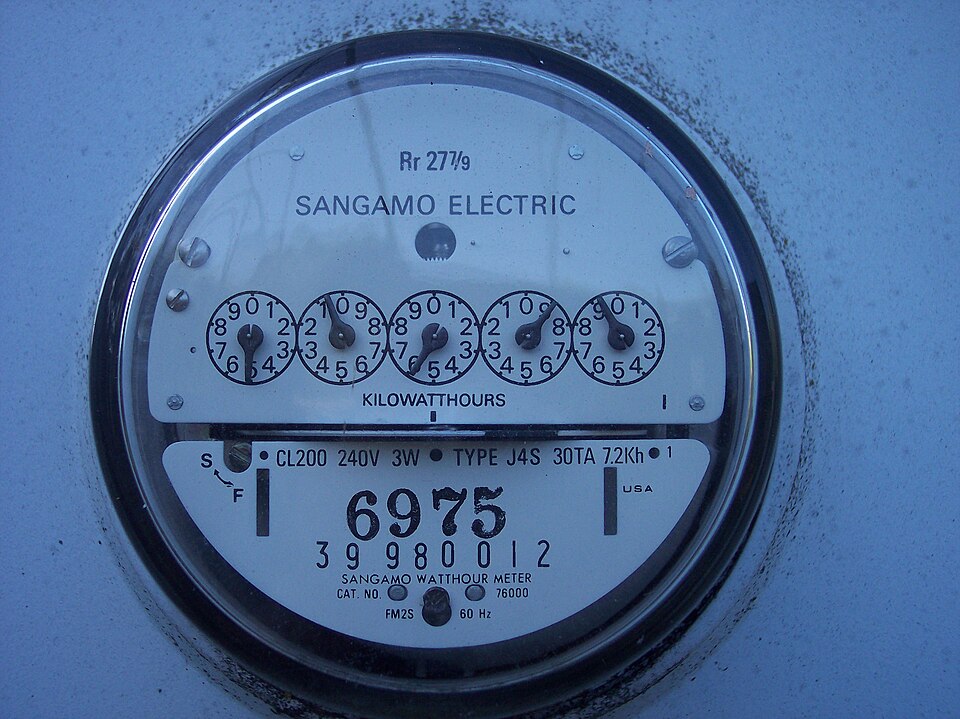
A traditional US residential meter often has a round clear cover, a row of small dials and a rotating disk. A digital meter shows numbers on a screen; its display may cycle through several readings. The casing alone does not identify your billing plan.
A smart meter can communicate readings to the utility. It is still the fixed meter, not an energy-monitoring app or a portable display. Your utility can explain which screen is the cumulative import reading for your model.
Reading a digital meter
Find the cumulative energy register measured in kWh. Do not confuse it with a date, meter ID, instantaneous kW value or test screen. Follow the utility’s instructions for the display codes on your meter.
Take two readings from the same register. For example, 11,900 kWh minus 11,000 kWh is 900 kWh used. If the bill shows a multiplier, the display rolls over, or the meter was replaced between readings, use the utility’s billed kWh in our calculator instead.
Reading an older dial meter
Read the numbered usage dials from left to right. Adjacent dials may turn in opposite directions. Between two numbers, record the lower one; between 9 and 0, record 9. When a pointer is exactly on a number, the dial to its right helps establish whether it has passed that number. Follow your utility’s model-specific instructions if uncertain.
Do not include a test dial or fractional register unless your utility asks for it. A photo taken from directly in front of the display can help you compare readings later.
Meter number, account number and solar readings
The meter number identifies the physical device. Your account number identifies the billing account. Neither is the changing kWh reading. Check the meter number when a bill appears to describe a different property or device.
Solar installations may show electricity delivered to your home and electricity exported to the grid separately. Do not subtract unrelated registers or assume exported kWh receive the retail price. Use the utility’s net-metering or export-credit statement.
Sources
Utility examples describe that utility’s service; check your own provider’s guidance.